
Built-in MFA
Use Datawiza MFA methods at the gateway layer without waiting for a separate CIAM or IdP deployment.
MFA gateway
Datawiza Access Proxy can act as a no-code MFA gateway for customer portals, partner apps, internal tools, and legacy web applications.
Place Datawiza in front of the app, use built-in MFA, and enforce access policy before traffic reaches protected resources. No application code changes, user migration, or separate CIAM rollout required.










The practical difference
Instead of embedding MFA logic into every application, an MFA gateway becomes the control point between users and apps. Security teams can apply policy centrally while application teams avoid risky login rewrites.
Use Datawiza MFA methods at the gateway layer without waiting for a separate CIAM or IdP deployment.
Route app traffic through Datawiza Access Proxy and enforce MFA without changing protected application source code.
Apply MFA by app, path, user, group, audience, or rollout stage from one enforcement layer.
Capture access, MFA, policy, and application-routing events for security review, troubleshooting, and compliance evidence.
Comparison
The gateway model is strongest when you need MFA across existing applications that were not designed for modern authentication.
| Criteria | Datawiza Access Proxy | App-by-App MFA Coding |
|---|---|---|
| Enforcement point | MFA is enforced by Datawiza Access Proxy before approved traffic reaches the app. | MFA logic is implemented separately inside each application or login flow. |
| Application changes | No source-code changes, app-server plugins, or login rewrites required for the protected app. | Each app needs development, regression testing, release planning, and long-term maintenance. |
| Identity migration | No user migration or CIAM rollout is required to start enforcing built-in MFA. | Often tied to broader identity migration, SDK adoption, or user-store changes. |
| Legacy compatibility | Works well for legacy and custom apps that do not natively support SAML, OIDC, or MFA. | Depends on what each application can support and what the team can safely modify. |
| Policy consistency | MFA, access policy, and audit are centralized at the gateway layer. | Policy can fragment across apps, frameworks, and development teams. |
| Best-fit project | Fast MFA rollout for existing apps without code changes. | Deep application modernization where teams already plan to rewrite login. |
Architecture proof
Identity provider migrations are useful when you are rebuilding identity, migrating users, or redesigning login across applications. But if the immediate goal is to add MFA to existing apps, that path can create more work than the security project needs.
Datawiza Access Proxy gives teams a faster deployment model: choose the MFA source that fits each user population, place enforcement in front of the app, keep the application unchanged, and roll out stronger access control app by app.
Good fit for new apps or broad customer identity transformation. Slower fit when the app simply needs MFA now.
Good fit for legacy apps, customer portals, partner apps, and internal tools that need MFA without code changes.
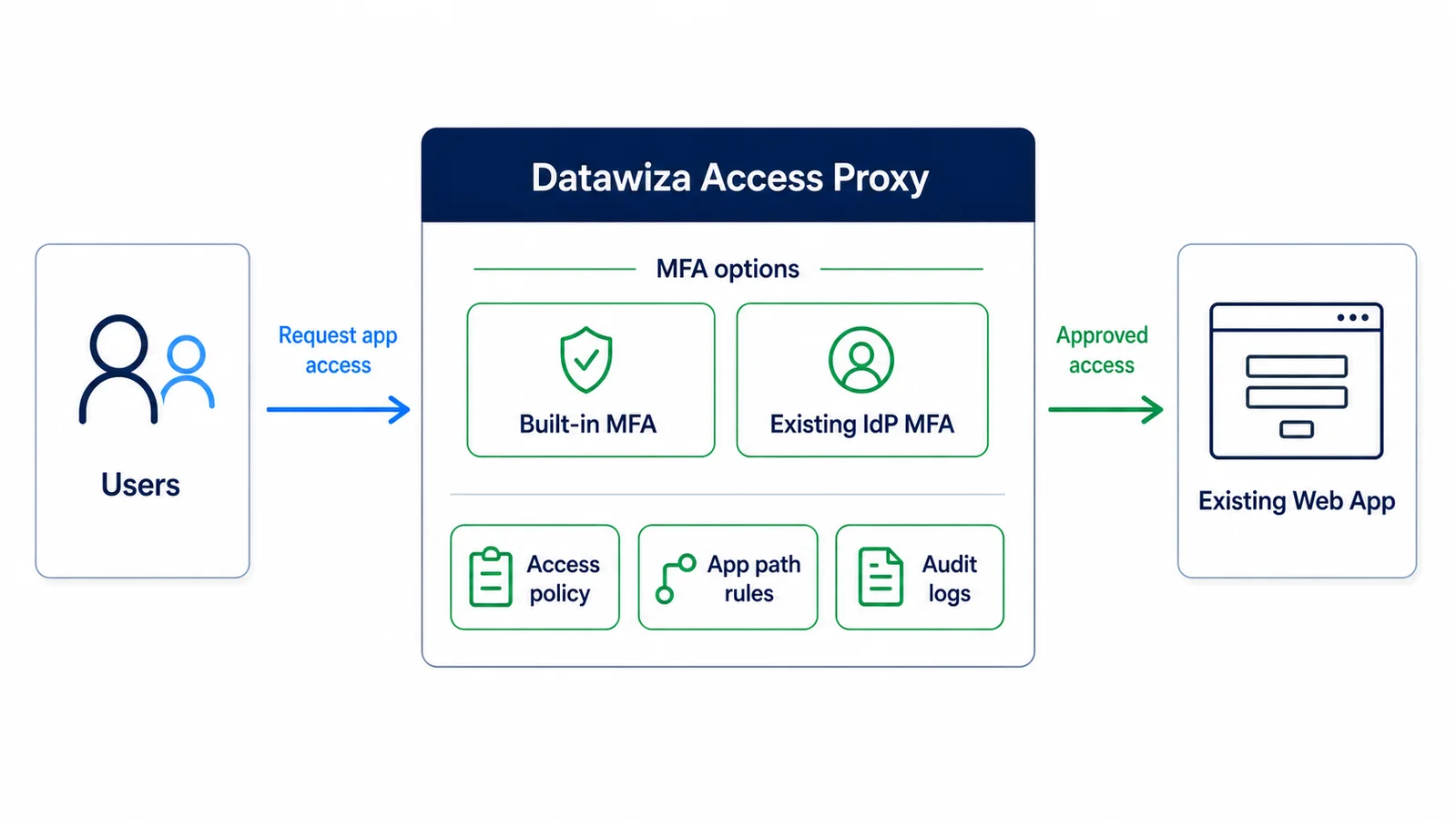
Proxy-based MFA architecture
Why teams choose this path
Deployment timeline
Start with one app, validate the policy, then repeat the same access-layer pattern across the rest of the portfolio.
Choose a high-risk customer portal, partner app, internal tool, or legacy application.
Route traffic through Datawiza Access Proxy, choose built-in MFA or your existing identity provider, and define who should be challenged, when, and for which app paths.
Validate the user experience, access logs, and rollback plan with a limited audience.
Apply the same gateway pattern to more apps without starting a new MFA coding project each time.
Customer proof
“Datawiza is the least friction option to move to a modern MFA. By going with Datawiza and getting this done in a very short time, we were the heroes.”
Related MFA use cases
Explore practical MFA patterns for customer portals, internal systems, legacy applications, ERP platforms, and other existing web apps.
Start with the main overview for built-in MFA, proxy enforcement, app coverage, and rollout strategy.
Get the definition of no-code MFA, including built-in MFA, identity provider mode, and where access-layer enforcement fits.
Protect PeopleSoft HCM, payroll, employee self-service, retiree portals, and other web-based HR systems without changing app code.
Add MFA to legacy applications without changing source code, migrating users, or waiting for an application rewrite.
Add MFA or 2FA to public-facing, external-facing, internet-facing, internal, and custom web applications without changing app code.
Add MFA to IIS applications without touching code, using Datawiza built-in MFA or Entra ID, Okta, Ping, or Duo as the identity provider.
Protect admin portals, admin dashboards, back-office apps, and privileged web consoles with MFA before app access.
Protect customer portals, partner apps, vendor portals, and customer-facing applications without forcing a CIAM migration.
How it works
Datawiza Access Proxy sits between users and protected apps. It verifies the user, enforces MFA, applies policy, then forwards approved requests to the application.
Route user traffic through Datawiza Access Proxy before requests reach the protected application.
Use Datawiza built-in MFA methods and configure when users should be challenged.
Apply rules by app, path, user group, audience, and rollout phase before the app receives traffic.
Start with one high-risk app, validate the policy, then extend MFA enforcement across more existing apps.
Use cases
FAQ
An MFA gateway sits in front of a web application, verifies the user, enforces a multi-factor authentication challenge, and only forwards approved traffic to the protected app.
Yes. No-code MFA is a use case of Datawiza Access Proxy. For this use case, Access Proxy acts as an MFA gateway that enforces built-in MFA before app access.
No. Datawiza Access Proxy provides built-in MFA, so you can start enforcing MFA without another identity provider. You can still connect an IdP later when that fits the architecture.
No. The gateway approach enforces MFA before requests reach the app, so protected applications do not need to implement MFA logic themselves.
Customer portals, partner portals, internal tools, legacy ERP and CRM apps, and custom web applications are common fits, especially when they lack native MFA support.
Next step
Bring one customer portal, B2B app, internal tool, or legacy web application. Datawiza can show where Access Proxy sits, how MFA is enforced, and what changes are avoided.