
Customer portals
Protect customer, member, patient, and student accounts while keeping the portal login and user store you already have.
No-code MFA
Protect customer portals, partner apps, and other existing web applications while keeping the login and user accounts you already have.
Datawiza adds an MFA challenge after your app validates the existing login. No IdP, AD, or LDAP integration required.
Hosted by Datawiza: configure your app and MFA policy, then route traffic with a DNS update. Self-hosting is also available.
Watch the no-code MFA demo
Existing login. An MFA challenge. Access to your app.









App coverage
MFA projects often stall because each app has a different login pattern, protocol, user population, and release process. Datawiza gives teams one control point for those mixed environments.
Protect customer, member, patient, and student accounts while keeping the portal login and user store you already have.
Protect supplier, partner, vendor, and B2B portals even when every external user belongs to a different organization.
Add gateway-enforced MFA to employee apps that were not built for SAML, OIDC, or modern SSO.
Modernize authentication for ERP, CRM, Java, PHP, .NET, and other custom systems without rewriting application code.
Architecture
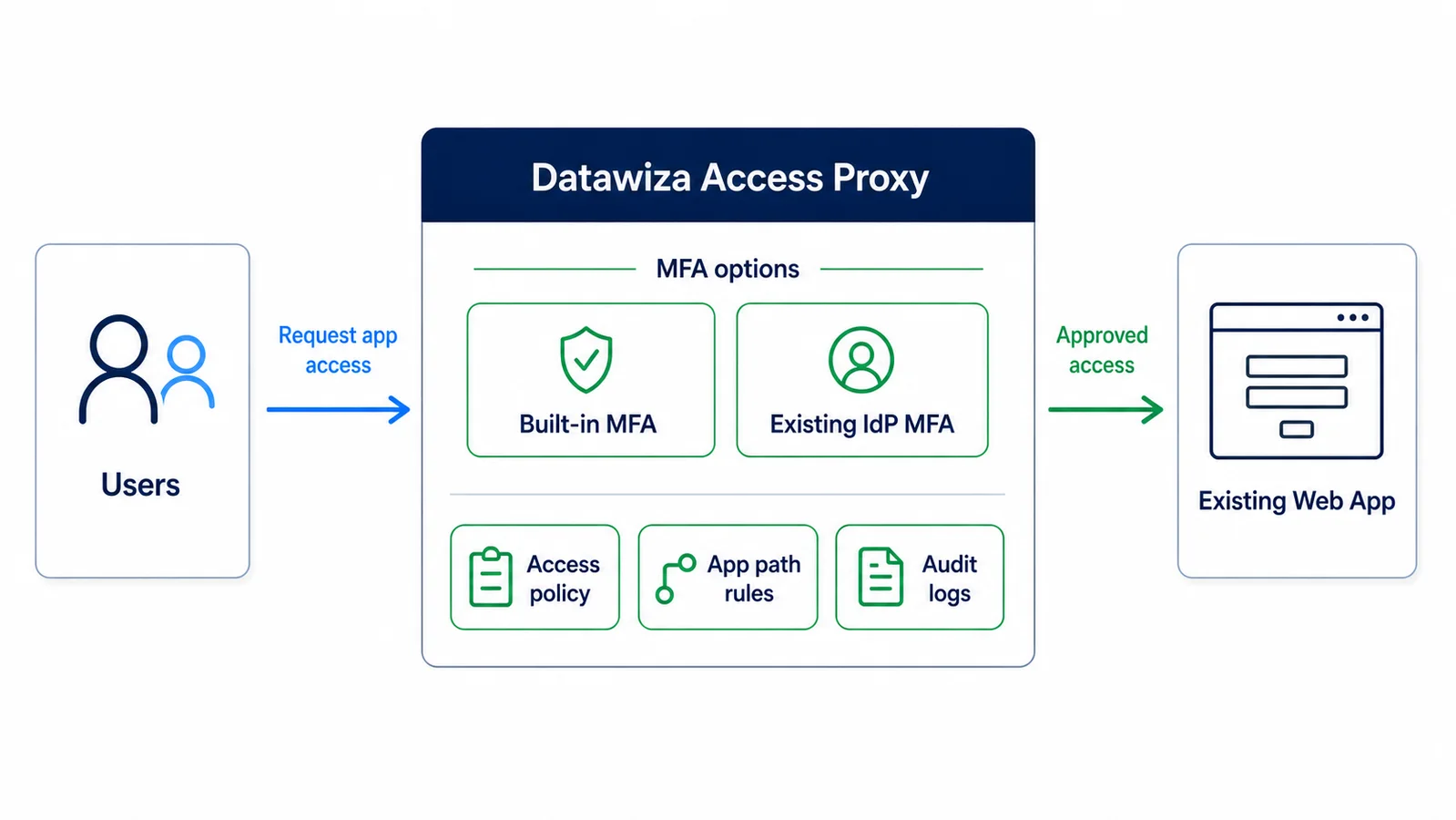
Datawiza Access Proxy sits between users and protected web apps. Your application continues to validate its existing username and password. After a successful login, Datawiza adds MFA before the user continues to protected content.
Built-in MFA keeps customer and partner accounts in the application. Users enroll in a second factor without moving their passwords into an IdP or directory.
Customers and partners enter their current credentials. Your application validates them against its existing user store.
After successful primary sign-in, Datawiza prompts the user to enroll in or complete the configured second factor.
Once MFA succeeds, the user continues to protected content with the application permissions they already have.
Proxy-based MFA architecture
Why teams choose this path
Deployment
Use the hosted service for a DNS-based rollout, or run Datawiza in your own environment. Start with one app and validate its login and access requirements.
Review your login and session flow. Configure the application hostname, upstream connection, TLS, MFA methods, and access policies.
For hosted deployment, update DNS to route app traffic through Datawiza. Restrict direct access to the app so users cannot bypass MFA.
Test enrollment, sign-in, protected routes, logout, and recovery with a small group before expanding enforcement.
Review access logs and support procedures, then extend MFA to more users and applications without migrating their passwords.
Capabilities
Add the MFA checkpoint through Datawiza Access Proxy without adding an MFA SDK or changing application source code.
Users sign in with their current application credentials, then complete built-in MFA. No separate IdP, AD, or LDAP integration is required.
Roll out in phases by app, audience, path, or policy instead of rebuilding login flows app by app.
Keep accounts in the existing application user store. Add MFA enrollment without moving users to a new identity platform.
Capture sign-in, policy, MFA, and access events for security review, compliance evidence, and troubleshooting.
Reduce custom MFA coding, connector work, regression testing, and long-term maintenance across application teams.
MFA methods
Datawiza can provide the MFA service directly, or enforce MFA through Microsoft Entra ID, Okta, Ping, Cisco Duo, and other IdPs already used by your organization. The protected app does not need to implement either path itself.
Common goals
FAQ
Yes. Datawiza Access Proxy can sit in front of a web application and require MFA before access continues, so the app itself does not need native MFA support.
No. Users keep their existing application accounts and passwords. The app validates the login, then Datawiza requires MFA before protected access. Users enroll an MFA method, but their application accounts do not move to a new user store.
No. Datawiza built-in MFA works with the application's existing login without requiring a separate identity provider or an AD or LDAP integration. If you already use an IdP, Datawiza can integrate with it when useful.
For hosted deployment, configure the app connection, hostname, TLS, and MFA policies, then update DNS so app traffic passes through Datawiza. Restrict direct access to the app's origin so protected routes cannot bypass MFA. Pilot login, enrollment, recovery, and logout before rollout. Self-hosting in your own environment is also available.
Datawiza Access Proxy provides built-in MFA methods such as OTP, authenticator app codes, WebAuthn/FIDO2, and certificate-based authentication. You can also connect an existing identity provider when that is useful, but it is not required.
Datawiza is designed for phased rollout. Teams commonly start with one high-risk app, validate policy, then expand to other customer, B2B, employee, or legacy apps.
Yes. Datawiza can help with MFA controls for compliance programs such as SOC 2, HIPAA, PCI DSS, NYDFS, NIS2, NIST, cyber insurance, and internal security policies.
No. For this use case, Datawiza Access Proxy can enforce MFA in front of existing applications without an IdP migration. If you already use an identity provider, Datawiza can integrate with it, but a separate IdP rollout is not required.
No-Code MFA is a use case of Datawiza Access Proxy. The same Access Proxy platform can also help with SSO, header-based app integration, access policy, and app modernization.
Datawiza adds MFA to existing web applications while keeping their login and user store. CIAM platforms cover broader customer identity needs such as registration, login, and user lifecycle management. Choose the approach that fits whether you need MFA for an existing app or a wider identity project.
A no-code MFA gateway adds an MFA checkpoint in front of protected application content without an MFA SDK or source-code changes. With Datawiza built-in MFA, the existing app validates the user's login first, then Datawiza requires the additional factor before protected access.
Customer testimony
Datawiza is the least friction option to move to a modern MFA. By going with Datawiza and getting this done in a very short time, we were the heroes.
Jeff Farinich
SVP of Technology Services and CISO, New American Funding
Datawiza is the ideal solution for adding MFA to on-prem applications without the need to overhaul existing code or infrastructure.

Ronan Hurley
IT Administrator, Central Applications Office
With Datawiza, we rapidly enhanced security and improved the user experience through MFA and SSO without coding our own connector.

Manoj Chitre
CIO, Claremont Graduate University
Working with Datawiza and their team was a great experience. They went out of their way to ensure an easy and successful implementation.

Kent West
Director of IT, Roy Jorgensen
From industry events to new product releases, read it here first.




Keep your current login and users. See how to add MFA to your customer portal, partner app, or existing web application.