
Protect external access
Add MFA to partner portals, supplier portals, vendor portals, and other B2B apps even when the app was not built for modern identity.
MFA for partner portals
Add built-in MFA while keeping your existing partner accounts and login. No user migration, IdP, AD, or LDAP required. For hosted deployment, route portal traffic through Datawiza with a DNS update.
Product demo
See MFA for B2B Apps in Action











Why it matters
Existing B2B apps often serve users who are outside the workforce identity system. Adding MFA can turn into an application rewrite, external-user migration, or CIAM project. Datawiza closes the access gap without making those prerequisites part of the MFA rollout.
Add MFA to partner portals, supplier portals, vendor portals, and other B2B apps even when the app was not built for modern identity.
Use your existing identity provider, Datawiza built-in MFA, or a mix of both depending on the audience.
Capture authentication, policy, and access logs to support audits, compliance reviews, and investigations.
Customer proof
“Datawiza is the least friction option to move to a modern MFA. By going with Datawiza and getting this done in a very short time, we were the heroes.”
Use cases
Protect portals used by partners, resellers, suppliers, franchisees, and vendors with MFA at the access layer.
Apply tenant-aware access policy without forcing every tenant through the same login model.
Add stronger authentication for contractors, agencies, and external workforce users.
Step up authentication for sensitive workflows, admin areas, or high-risk app paths.
Architecture
Datawiza Access Proxy sits in front of the B2B app and enforces MFA before access. Choose the identity path that fits each partner, supplier, vendor, or tenant population while the application and its user store stay unchanged.
External users sign in with the application credentials they already have, then complete Datawiza MFA before access. No separate IdP account or user migration is required.
Federate selected B2B users through Microsoft Entra ID, Okta, Ping, Duo, or another enterprise IdP over SAML or OIDC.
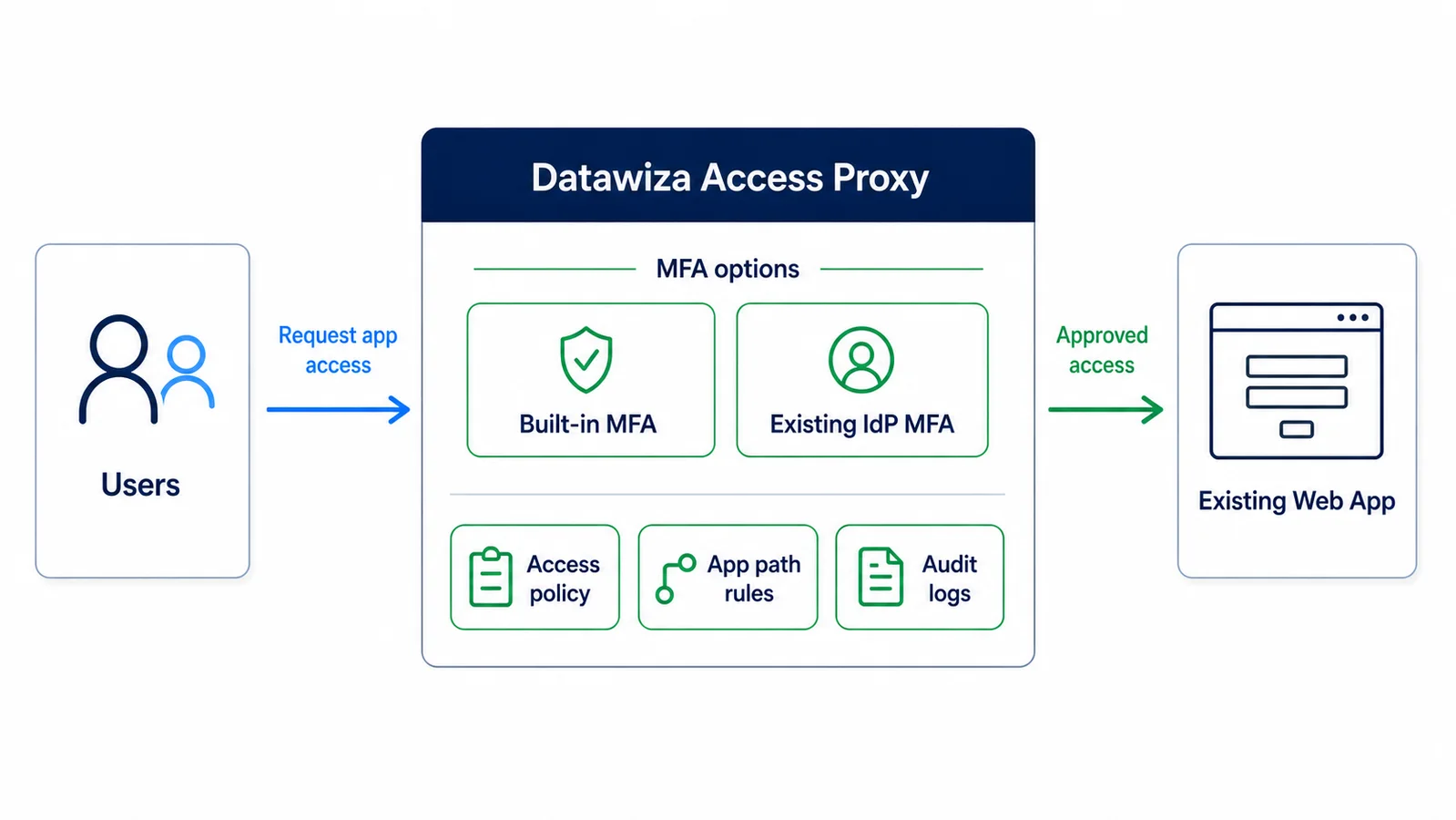
How it works
Route partner portal traffic through Datawiza Access Proxy and enable built-in MFA. Partners keep their existing application accounts and login, with no IdP, AD, or LDAP required. Existing IdP integration is also available when useful.
Rollout timeline
Start with one portal, validate the MFA policy, then repeat the same access-layer pattern across the rest of your B2B app portfolio.
Day 0
Choose one partner, supplier, or vendor portal where MFA risk reduction matters most.
Day 1
Route traffic through Datawiza Access Proxy, turn on MFA policy, and define who should be challenged and when.
Pilot
Validate the user experience, access logs, and rollback plan with a limited external-user audience.
After pilot
Repeat the same access-layer pattern across more B2B apps without starting a new MFA coding project each time.
Deployment
Use Datawiza as a managed service and route portal traffic through it with a DNS update.
Run the enforcement layer in your own environment when apps, network paths, or policy require it.
Protect public-facing and internal B2B apps with a deployment model that fits each application.
FAQ
MFA for B2B adds a second verification step when partners, suppliers, vendors, contractors, or tenant users access a B2B application or portal. Datawiza can enforce that MFA at the access layer without changing the application or migrating its users.
Yes. Datawiza can sit in front of apps that do not natively support modern identity protocols and enforce MFA before access is granted.
No. With Datawiza built-in MFA, partners, suppliers, and vendors can sign in with their existing application credentials first and complete MFA before access. The application user store and login flow stay in place.
Yes. Datawiza built-in MFA can protect a B2B portal at the access layer, so you do not need to start with a full CIAM or IdP migration just to enforce MFA.
Most teams start with one high-risk partner, supplier, or vendor portal. They put Datawiza Access Proxy in front, turn on MFA policy, validate the user experience, then expand to more B2B apps.
Yes. Policies can be applied by audience, tenant, group, app path, or rollout stage, so you can protect sensitive external-user workflows without forcing every B2B user through the same experience on day one.
From industry events to new product releases, read it here first.



See how to add MFA to your partner, supplier, or vendor portal while keeping your current accounts and login.