
The app must stay on premises
Residency, compliance, architecture, or operational constraints may keep the application and its data in your environment.
MFA for on-prem apps
Protect on-prem web apps with Datawiza built-in MFA or MFA from your existing identity provider. Deploy in your data center, private cloud, customer cloud, or as a hosted service without rewriting login or moving the application.

Why on-prem MFA is hard
Many on-prem web applications were built before modern MFA, SAML, and OIDC. Rewriting login can create more risk than it removes, but security and compliance deadlines still apply.
Residency, compliance, architecture, or operational constraints may keep the application and its data in your environment.
Older frameworks, packaged applications, and fragile session behavior make authentication changes slow and risky.
The app may already sit behind a VPN, ZTNA service, load balancer, gateway, reverse proxy, or internal DNS.
Security teams, auditors, insurers, and customers may require MFA before application modernization is ready.
Architecture
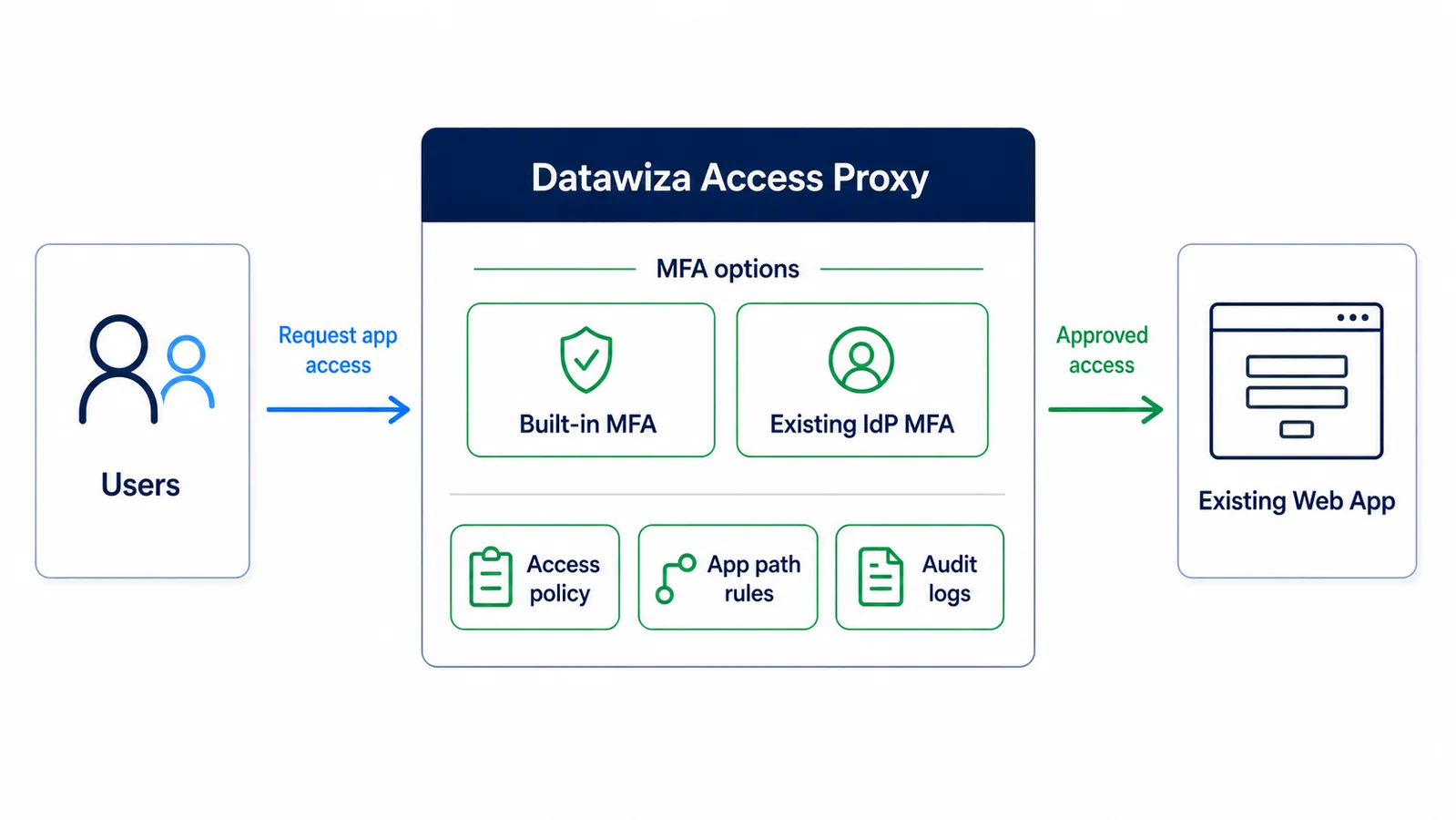
Datawiza Access Proxy sits between users and the on-prem web app. Choose the MFA path that fits each application and user population.
Users sign in with their existing application credentials first. Datawiza then enforces MFA before access continues, with no separate IdP account or user synchronization required.
Connect Microsoft Entra ID, Okta, Ping, Cisco Duo, or another enterprise IdP over SAML or OIDC for SSO, MFA, and centralized identity policy.
In both modes, only approved traffic reaches the app. Application code, login flow, sessions, and user store stay unchanged.
How it works
Deploy Datawiza in your data center, private cloud, customer cloud, or hosted model and route web traffic through it.
Use built-in MFA with the application's current credentials, or integrate your existing IdP over SAML or OIDC.
Enforce MFA, application-path rules, and centralized policy before users receive access to protected resources.
Datawiza sends approved traffic to the application while its code, login flow, user store, and deployment remain intact.
On-Prem MFA Demo
Watch Datawiza Access Proxy enforce MFA before access to an existing on-prem web app while its code, login flow, sessions, and user store remain unchanged. Use Datawiza built-in MFA or your existing enterprise IdP in a data center, private cloud, or hybrid environment.
Best fit
This pattern is strongest when a web application must remain in its current environment but needs modern authentication now.
For a Microsoft-specific deployment pattern, see Azure MFA for on-premises applications.
Common candidates
Legacy and packaged web apps used by employees and contractors
Customer, partner, supplier, and vendor portals hosted on premises
ERP, HR, finance, administrative, and operational web applications
Apps behind F5, Nginx, Azure Application Gateway, AWS ALB, VPN, or ZTNA
Hybrid environments using Entra ID, Okta, Ping, Cisco Duo, or Datawiza built-in MFA
Deployment options
Keep the application local while choosing the access-layer deployment that matches your network, ownership, and operational model.
Run Datawiza close to applications and data that must remain in your own network.
Protect private apps in hybrid environments or staged cloud-migration architectures.
Fit Datawiza into the load balancer, reverse proxy, or gateway path already serving the app.
Use a hosted service when it fits the application's routing and network requirements, with no application code changes.
FAQ
MFA for on-prem apps adds a second authentication factor before users receive access to a web application hosted in a data center, private cloud, or other customer-managed environment. Datawiza enforces that control at the access layer so the application can stay where it runs today.
Yes. Datawiza Access Proxy sits in front of the on-prem web application and enforces MFA in the request path. The application does not need new MFA code, an SDK, or a rewritten login flow.
No. Datawiza built-in MFA works with the application's existing credentials, so a new identity provider or user migration is not required. If you already use an enterprise IdP, Datawiza can integrate with it instead.
Yes. Datawiza can integrate with identity providers such as Microsoft Entra ID, Okta, Ping, Cisco Duo, and others using SAML or OIDC, depending on the deployment.
Yes. Datawiza supports customer-managed deployment in a data center, private cloud, or customer cloud. A hosted service is also available when it fits the application's network path.
No. The same access-proxy pattern can protect internal apps and on-prem customer, partner, supplier, or vendor portals, provided they are web applications that can be placed behind the proxy.
Sign up to secure your AI agents and critical enterprise apps