Quick Implementation
Datawiza can typically be deployed in minutes.
Datawiza empowers SSO (Single Sign-On) and MFA (Multi-Factor Authentication) / 2FA (Two-Factor Authentication) for OWA (Outlook on the web, formerly Outlook Web App and Outlook Web Access). It seamlessly integrates with popular SSO and MFA/2FA services, such as Microsoft Entra ID (Azure AD, Office 365, M365), Okta, Ping Identity (PingOne), Cisco Duo, Google, AWS and others via SAML or OpenID Connect (OIDC) protocol.
No software patches or plugins need to be installed on your OWA Exchange servers.
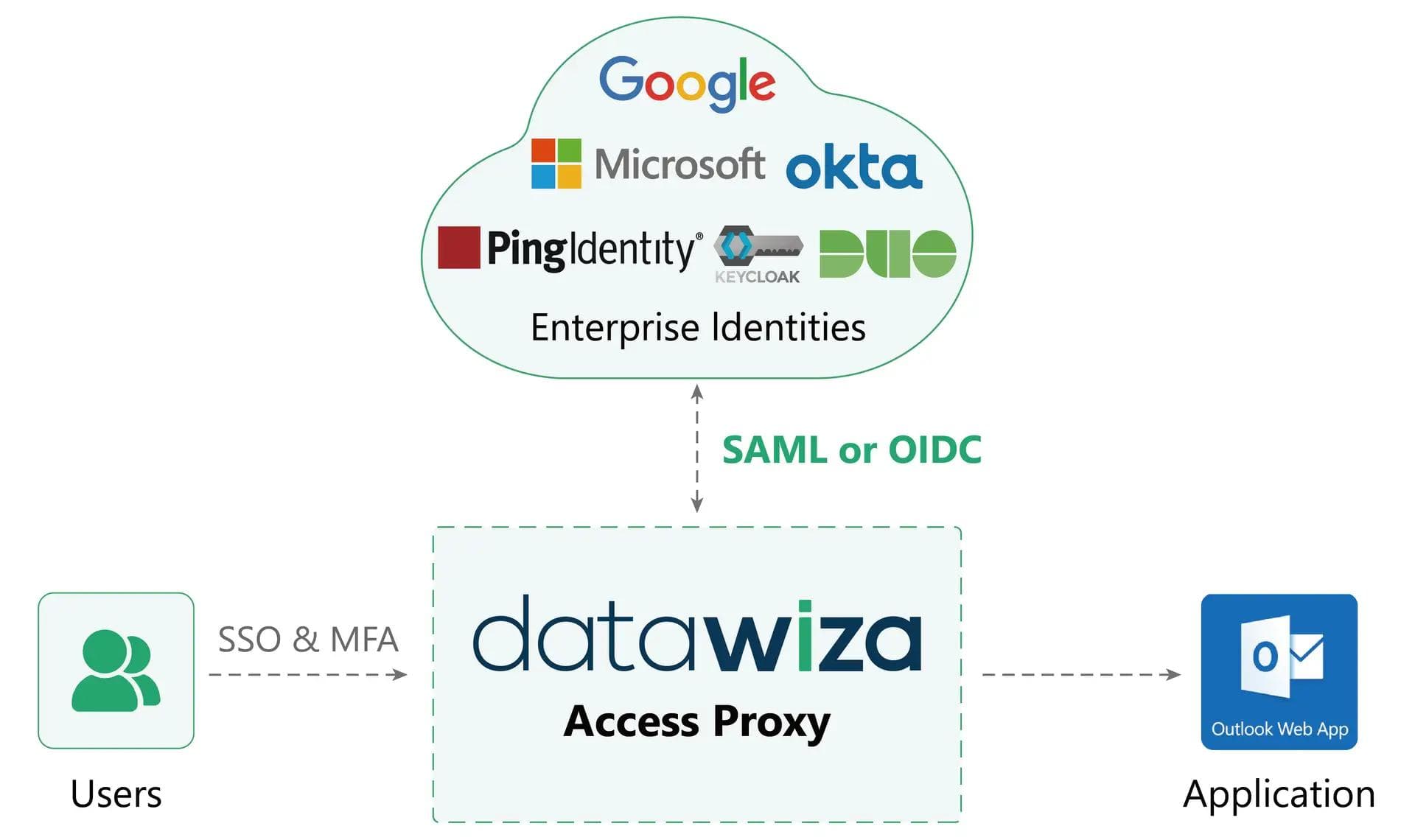











Datawiza bridge
Why Datawiza
Datawiza can typically be deployed in minutes.
Integrate with any identity providers including Microsoft Entra ID (Azure AD), Okta, Ping, Cisco Duo, IDCS, Google Workspace and others via OpenID Connect (OIDC), OAuth, SAML, LDAP.
Simply run our Datawiza software as a container on a server for an easy and seamless integration.
Implementation
By acting as a reverse proxy, Datawiza Access Proxy (DAP) sits between users and the OWA Exchange server, seamlessly integrating with leading identity providers like Microsoft Entra ID (Azure AD), Okta, and Ping Identity. When users access OWA, they are securely redirected to your chosen identity provider for SSO authentication—including MFA—before gaining access.
This modern approach leverages standard protocols (such as OIDC, OAuth, or SAML) and works with all OWA on-premises versions. Datawiza handles all token translation and Kerberos ticketing automatically, so you can quickly enable secure, unified login experiences for OWA users—without complex infrastructure or software changes.
A reverse proxy that can be deployed in your environment or delivered as a managed service.
A centralized console for configuring access policies, aggregating logs, and managing visibility.
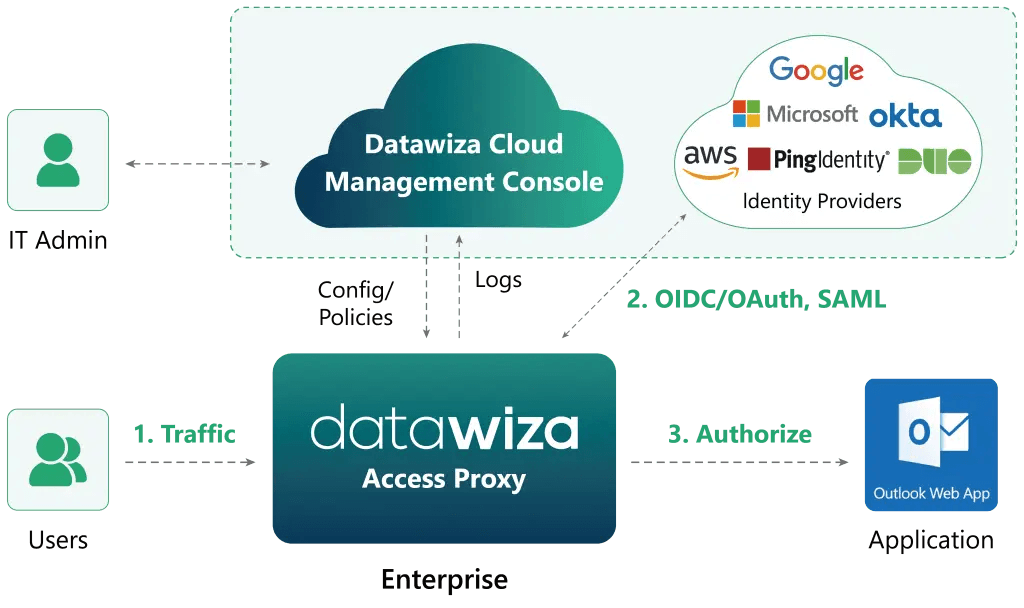
Customer testimony
Datawiza is the least friction option to move to a modern MFA. By going with Datawiza and getting this done in a very short time, we were the heroes.
Jeff Fairinich
SVP of Technology Services and CISO, New American Funding
With Datawiza, we rapidly enhanced security and improved the user experience through MFA and SSO without coding our own connector.
Manoj Chitre
CIO, Claremont Graduate University
Datawiza gave us peace of mind around multifactor authentication and a seamless Microsoft authentication experience for our JDE users.
Kent West
Director of IT, Roy Jorgensen
FAQ
Some Microsoft identity architectures can enforce MFA for Exchange access, but many on-premises OWA deployments do not have a simple native MFA switch that covers the existing login flow. Datawiza helps by enforcing MFA at the access layer in front of OWA.
Yes. Datawiza Access Proxy can sit in front of OWA and Exchange, integrate with your preferred IdP or Datawiza built-in MFA, and allow access only after the required authentication and MFA policy succeeds. No Exchange code changes, patches, or plugins are required.
From industry events to new product releases, read it here first.




Sign up to secure your AI agents and critical enterprise apps