
Central identity
Use the same enterprise identity provider and MFA policy that protects the rest of the organization.
WordPress SSO and MFA
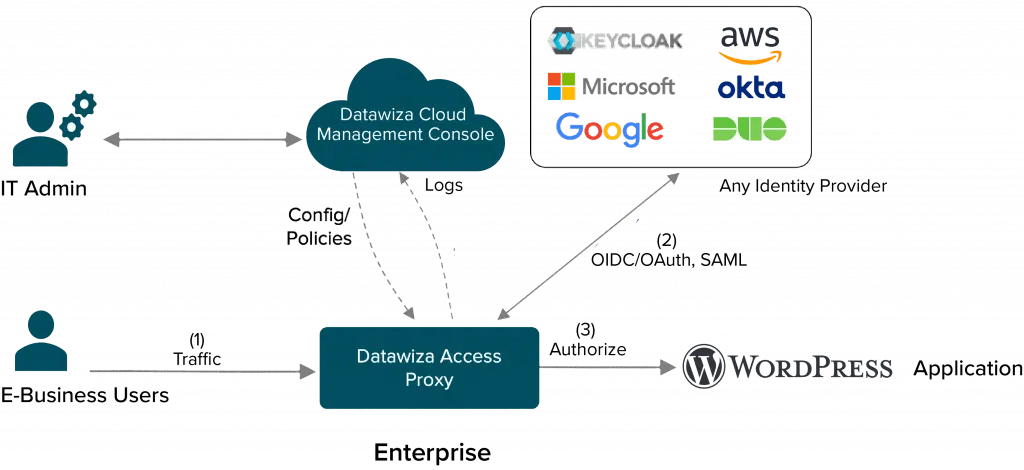
Put Datawiza Access Proxy in front of WordPress to authenticate users with Microsoft Entra ID, Okta, Duo, Ping, Auth0, Cognito, Google Workspace, or another SAML/OIDC provider while keeping the WordPress app stable.
Why teams use Datawiza
Use the same enterprise identity provider and MFA policy that protects the rest of the organization.
Avoid stacking authentication changes inside WordPress when the site is important, customized, or sensitive.
Protect admin paths, private content, and sensitive workflows with centralized access-layer rules.
Add SSO and MFA without rebuilding themes, changing core WordPress logic, or waiting for a larger migration.
How it works
Route WordPress traffic through Datawiza Access Proxy so authentication happens before requests reach the site.
Use Entra ID, Okta, Duo, Ping, Auth0, Cognito, Google Workspace, or another SAML/OIDC provider.
Let only authenticated and authorized traffic continue to the WordPress application.
Use centralized logs to review sign-ins, policy decisions, and sensitive access activity.
Best fit
Use Datawiza when WordPress is important enough to require enterprise access control, but you want to avoid risky application changes.
For a broader pattern, see SSO for legacy apps without code changes.
Good candidates include
Employee, customer, partner, member, or vendor-facing WordPress sites
WordPress admin paths that need stronger MFA and tighter policy
Private portals, gated content, intranets, and operational WordPress apps
Sites using a preferred enterprise identity provider for SSO and MFA
Teams that want SSO, MFA, policy, and audit without changing WordPress code
Rollout
Identify login, admin, private-content, and sensitive workflow URLs that need protection.
Connect the identity provider and define which users or groups can reach the site.
Test routing, session behavior, MFA prompts, and WordPress functionality before cutover.
Move production traffic through Datawiza and monitor authentication and access logs.
FAQ
No. Datawiza is designed to enforce access controls in front of the application, so teams can avoid changing WordPress source code.
Datawiza supports common SAML and OIDC identity providers such as Microsoft Entra ID, Okta, Auth0, Ping, Google Workspace, Duo, and Amazon Cognito.
Yes. Datawiza can apply access-layer policy to specific paths, including admin areas and private content paths.
No. The same proxy-layer pattern can protect many legacy, custom, and vendor web applications.
Datawiza can review your WordPress entry points and identity provider setup and show the quickest path to enterprise SSO and MFA.
Sign up to secure your AI agents and critical enterprise apps